页面采用模板设计模式,通过渲染的时候替换页面中的动态部分实现动态页面。
每个页面包含3个部分,其中htmlx为必选,cssx,script为可选
htmlx是动态模板界面,支持大部分的html标准标签,自定义扩展标签以及关联数据模板,其设计方式和目前大部分的小程序页面类似
cssx为样式定义部分,其中可以按照标准编写 css样式,所有的非行内样式都应该写到这个部分中,系统会对这个文件中的 样式进行处理
script为代码部分,该部分为一个lambda表达式函数,提供参数和代码以及方法定义等功能
界面设计
整体概述
界面设置整体样式如下,下面的实例中 会有以下3个部分:
- 标准html标签
- 扩展标签
- 动态注入的数据
标准html标签
htmlx中支持标准的htmlx标签,例如 div style等等,但是具有以下约束
- css样式必须写在cssx中
- 代码必须写在script中
示例:
<div key="main" class="main">
    ...
</div>
<input>的数据绑定
<input>的数据绑定分为两种: 一、受控数据绑定
<input type=radio value="{{$type}}" onchange="()=>_setType(2)" name="xxx">
<input type=string value="{{$name}}" onchange="(newValue)=>_setName(newValue)" name="xxx">
(ownerID,params)=>

  $type = 0;
  function _setType(int newValue)
    $type = newValue;
    _refresh();
  end function

  $name = "";
  function _setName(int newValue)
    $name = newValue;
    _refresh();
  end function
二、非受控(推荐,因为不会引起界面刷新) 直接绑定到变量或者绑定到map中某个对应的key的值
2.1 直接绑定变量
<input type=radio binddata="$type" binddatavalue="2" name="xxx">
(ownerID,params)=>

  $type = 0;
2.2 绑定一个map中的某个key对应的值
<input type=radio  binddata="$fieldMap" binddatakey="type" binddatavalue="2" name="xxx">
<input type=string binddata="$fieldMap" binddatakey="name"  name="xxx">
(ownerID,params)=>

  $fieldMap = _mapObj_new();
注意: 如果input的 type='checkbox' ,则绑定的单个变量的类型必须为 string,因为系统会自动使用 逗号分隔符拼接用户的多选字符串
扩展属性属性说明:
| 属性名 | 值 | 描述 |
|---|---|---|
| binddata | 绑定到变量 可以是一个具体的变量,或者是一个map | |
| binddatakey(可选) | 当绑定到map的时候,需要制定一个key,对应在map中的ky | |
| datasource(可选) | 当 input的 type为 radio或者checkbox的时候必填,其他时候不能填写 |
标准组件标签
icon
封装了 antd的 Icon标签,type支持 antd3.x版本中的 type
<icon type="right" style="font-size:16px"></icon>
htmlcontainer
封装了 html的内容 content 为内部的 html字符串
<htmlcontainer style="width:200px;margin: 0 auto;" content="{{content}}"></htmlcontainer>
fontawsone字体图标
显示图标
<script>
    <link rel="stylesheet" href="https://cdnjs.cloudflare.com/ajax/libs/font-awesome/6.3.0/css/all.min.css" />
</script>
    <i class="fa-solid fa-user"></i>
    <i class="fa-regular fa-user"></i>
    <i class="fa-light fa-user"></i>
    <i class="fa-thin fa-user"></i>
    <i class="fa-duotone fa-user"></i>

    <!-- a Brands icon -->
    <i class="fa-brands fa-font-awesome"></i>

    <!-- a specifically set Font Awesome Sharp Solid icon -->
    <i class="fa-sharp fa-solid fa-user"></i>

    <!-- a specifically set Font Awesome Sharp Regular icon -->
    <i class="fa-sharp fa-regular fa-user"></i>
tab页标签<rui_tabs>
<rui_tabs type='"line"|"card"|"editable-card"'>
    <rui_tabpane tab="command" key="command">
        <rui_query
            datasource="{{$datasourcechild}}"
            caption="command"
            >
        </rui_query>
    </rui_tabpane>
    <rui_tabpane tab="command2" key="command2">
        <rui_query
            datasource="{{$datasourcechild}}"
            caption="command2"
            >
        </rui_query>
    </rui_tabpane>
    </rui_tabs>
rui_avatar
显示一个头像,如果没有src,则显示一个字符串
    <rui_avatar style="width: 60px;height:60px;" src="" shape="circle"
        alt='{{_substr(_getCompondItemField(addressitem,"0b6e4314696142aea9e5cbf8f356a96c"),1,1)}}'>
    </rui_avatar>
avatar
显示一个头像,下面的例子显示 一个 购物车的图标, icontype 等同于 icon标签的 type
<avatar class="totaybadge" size="large" icontype="shopping-cart" >
</avatar>
rui_button
显示一个按钮
<rui_button onclick="_onManageClick" class="headerbutton">{{_iif("$curManageState","${"完成"}","${_getMultilanguage_Public(ownerID,"6c1df6f2e30f4c34a6d10312c7b41980","manage","manage")}")}}</rui_button>
    .headerbutton
    {
        color: red;
        float: right;
        display: block;
        height: 28px;
        padding: 4px;
    }
rui_checkbox
显示一个 检查框
<rui_checkbox text=""
    ruichecked="{{_dataSource_IsSelected($dataSourceMyCart,item)}}"
    onchange='(newValue)=>_onCheckedChanged(newValue,item)'>
</rui_checkbox>
badge
显示一个 徽标
 <badge size="small" count='{{ _to_number(_list_getByIndex(_split(":",data),1))}}'>
    <span>{{_list_getByIndex(_split(":",data),0))}}</span>
</badge>

<badge count="{{_count(_dataSource_getAllCompondItems($dataSourceMyCart))}}">
    <avatar class="totaybadge" size="large" icontype="shopping-cart" >
    </avatar>
</badge>
spin
显示一个 转动的图形
<spin tip="Loading..."></spin>
tag
显示一个标签
<tag color="magenta" style="bottom: 0;margin:auto;">默认</tag>
switch
显示一个 切换switch组件
    <switch style="float: left;margin-top: 9px;" size="small" ruichecked='{{_getCompondItemFieldValue(addressitem,"e5da53402dd7408584102c4c5fda9dbb")}}'
    actioncode="4c58103a584f4daab23e2efbfa0c42cd" showactionname slient postaction="_postModifyAddress">
</switch>
carousel
显示一个走马灯组件
<carousel autoplay dots>
    <div>
      <h3>1</h3>
    </div>
    <div>
      <h3>2</h3>
    </div>
</carousel>
rate
打分
<rate allowHalf defaultValue={2.5} ></rate>
rui_textbox
文本框
export interface TextBoxProps
{
    Text:string;
    readOnly?: boolean;
    disabled?: boolean;

    max?:  string;
    maxLength?: number;
    min?:  string;
    minLength?: number;
    //allowClear?: boolean;
    allowClear?: boolean;

    style?: CSSProperties;
    type?: string;
    placeholder?: string;

    onChange:(value: string)=>void;

    onBlur?:()=>void;
    onPressEnter?:()=>void;
    inputref?:React.LegacyRef<Input>
}
rui_textarea
多行边框
export interface TextareaProps
{
    Text:string;
    readOnly?: boolean;
    disabled?: boolean;
    onChange:(value: string)=>void;

    style?: CSSProperties;

    maxLength?: number;
    minLength?: number;
    allowClear?: boolean;

    //显示的行高
    rowCount?:number;

    onBlur?:()=>void;
    inputref?:React.Ref<TextAreaRef>
}
rui_barcode
条形码或者二维码
export interface MyBarCodeProp
{
    value:string;
    displayValue:boolean;
    width?:number;
    height:number;
    fontSize:number;
}
rui_numericupdown
数值输入框
export interface NumericUpDownProps
{
    Value:number;
    Minimum?:number;
    Maximum?:number;
    DecimalPlaces?:number;
    Increment?:number;
    MaxLength?:number;

    disabled?: boolean;
    readOnly?: boolean;
    required?: boolean;

    onChange:(value:number)=>void;

    style?: CSSProperties;
    precision?: number;

    onBlur?:()=>void;
    onPressEnter?:()=>void;
    inputref?:React.RefObject<HTMLInputElement>
}
rui_datetimepicker
日期和时间输入框
export interface DateTimePickerProps
{
    Value:Date;
    MinDate?:Date;
    MaxDate?:Date;
    Checked:boolean;

    //true:显示 日期he时间  flase:仅仅显示日期
    dateTimeType:PublicUI_MyParamValueSubType_Date;//ShowDateTime:boolean;

    onChange:(checked:boolean,value:Date)=>void;

    onBlur?:()=>void;
}
antd组件
参见antd网站文档 dropdown steps cascader tabs tabpane checkbox datepicker select slider timepicker treeselect upload calendar card collapse comment descriptions empty image list popover statistic table timeline tree alert drawer modal progress result anchor link backtop rate badge icon tag spin
可以点击类标签的事件处理
可以被点击的标签 a button input div switch rui_button
onclick
- 执行一个 点击事件,可以提供一个 lambda匿名表达式,参数根据情况
<a href="#" class="go2 button" onclick="()=>_setStep(2)"><i class="fa fa-check-circle-o" aria-hidden="true"></i> Continuer</a> - 绑定一个 函数名,表示直接执行这个函数,只能绑定无参函数 注意:前后不能有空格或者括号,只能是一个函数名
<ruibutton onclick="_onClick"></ruibutton>
actioncode
指定执行 某个 action 注意: 当绑定actioncode的时候,上下文必须有 compondItem
preventdefault stoppropagation
阻止时间的冒泡,防止事件被多次调用
slient
当执行的时候,实现静默处理,不显示一个默认的 进度提示框
preaction postaction
当绑定 actoncode的时候,在执行这个action的客户端脚本 前执行的 代码,以及在执行完这个action客户端脚本 之后执行的 代码
通用数据类扩展标签
通过脚本定义数据源
数据源可以通过脚本中创建 普通数据源以及创建 主从依赖数据源:
//Inscription 数据源
//                                         表code                              名称              queryID                      fixed条件
$datasourceInscription = _dataSource_New("3423a2ed72e940bda3eee3f721b4b976",  "Inscription","d9a32fc7005848a2a34a3014c6a02b48",null);

//创建 收付款数据源
$dataSourcePayOrCollect= _dataSource_New("eeb7989fa4014a7590d0ba60aadb60c1",  "Collect","0223d45cbd1e466cbe21949bd372e609",null);
//建立 收付款数据源 和 Inscription 数据源 之间的依赖关系
    $dependCollect = _where_new();
    // 从数据源(收付款数据源)的字段 == 主数据源(Inscription 数据源) 的字段Code
    _where_add($dependCollect,"00b3add61e7047dc9a476eb8e0fa23d9","Equal","33aaec1e0358450eba9bf8c0e700ec1f");
    _dataSource_addChildDepend($datasourceInscription,$dataSourcePayOrCollect,true,$dependCollect);
<rui_datasource>
为 包裹的 children 提供数据源
<rui_datasource datasource="{{$datasourceAddress}}">
... 包括在 此中的 数据显示类 和 Edit编辑类标签均 可以继承到这个 数据源
</rui_datasource>
属性:
| 属性 | 值 | 描述 |
|---|---|---|
| datasource | 指定dataSource变量 |
dataSource可以从script的参数中获取(某些场景下,参数中有datasource), 或者使用_dataSource_New创建一个数据源,具体创建方式,参见_dataSource_New函数 |
显示数据表格类扩展标签
<rui_query>
rui_query提供显示一个 数据查询结果列表,列表可以选择多种数据类型
<rui_query datasource="{{$datasourceActif}}" caption="payment"
            showtype="List" hideaction   hideexporttoexcel  hidehidevirtualbutton hidemultimode hideoriginalitems
            autoselectindex="0">
</rui_query>

<rui_query table="ec2bc90919b74b338de4feba593fd382"  queryid="fdf21aa768634e67b2e6f167f4e3950b" caption="MyEmploi"
            showtype="Table"   hideexporttoexcel >
</rui_query>
属性:
| 属性 | 值 | 描述 |
|---|---|---|
| 以下属性为 2选一,目的是提供数据源: | ||
| datasource | 指定数据源 | 可以通过如下方式在 script中创建数据源 $datasourceActif = _dataSource_New("TableCode", "Actif","queryCode",fixedConditionList|null); _dataSource_New的详细用法 以及 主从 数据源的 创建方法 详见 脚本语言说明手册 |
| table queryid | 指定数据源归属的tableCode 指定源中的queryid | |
| [可选]myname | 数据源的名称 | |
| [可选]caption | 标题 | |
| [可选]showtype | 显示方式 | 默认为Table,备选为TableTreeWithCatalog Tree List Card Week Calendar Detail Chart_Line Chart_Bar Chart_HBar Chart_Pie Chart_Gauge |
| [可选]othershowtypes | 其他可以给用户选择的显示方式 | 可选项同上,支持多个,当多个时用逗号隔开 例如:Tree,List |
| [可选]xscale | 转置的时候,x轴的缩放比例 | |
| [可选]yscale | 转置的时候,y轴的缩放比例 | |
| [可选]autoselectindex | 列表首次显示的时候,自动选择记录的索引号 | 以0开始的序号,例如:希望首次刷新后自动选择第一条记录,则设置此属性为0 autoselectindex="0" |
| [可选]autoselectrangekey | 列表首次显示的时候,自动选择记录的 主键 | 可 |
| [可选]filterbackclor | 过滤条件区的背景颜色 | |
| [可选]pagesize | 分页时每页显示的记录数 | 默认为20 |
| [可选]showsinglerefresh | 每条记录右边 显示 一个 小的单独刷新该记录的 action | |
| [可选]hideglobalaction | 隐藏所有的全局action | 默认为false |
| [可选]hideoriginalitems | 隐藏 原始记录 这个勾选项 | 默认为false。 勾选originalitems可以在查询的时候,同时获取原始记录,然后可以进行原始记录的备份 |
| [可选]hideaction | 隐藏 非全局action | |
| [可选]hidetoolbar | 隐藏工具栏 | 默认为false |
| [可选]hidefilter | 隐藏右上角的 过滤框 | |
| [可选]hidemultimode | 隐藏批量操作模式切换 | |
| [可选]hideexporttoexcel | 可 | |
| [可选]hidesearchbox | 可 | |
| [可选]hidepage | 不分页 | 默认为false,即分页 |
| [可选]hidehidevirtualbutton | 隐藏 切换是否显示虚拟记录按钮 | 默认为false |
| [可选]hidevirtual | 隐藏虚拟记录 | 默认为false |
| [可选]hidehideemptytranspositioncolumnbutton | 隐藏 切换隐藏空的转置列的 按钮 | |
| [可选]hideemptytranspositioncolumn | 隐藏空的转置列 | |
| [可选]asyncloadpage | 异步加载 | 默认为false |
| [可选]getcompondparam | 是否在查询时,同时自动获取params | 默认为false,如果为true,则下面的这个参数指定对应的actions |
| [可选]getcompondparamactioncode | 指定查询时 同时自动获取的 哪些aciton的params,多个aciton用逗号隔开 | 这些指定的action的params自动在查询的时候获取,并且缓存在客户端,以加快速度 |
显示数据类扩展标签
<rui_datarow>
rui_datarow扩展标签负责提供一行的显示
rui_datacell 可以 被包裹在 <rui_datasource> 中 如果 rui_datacell 没有被包括在 <rui_datasource> 中, 则 必须 自行指定 datasource 属性
使用 方式:
<rui_datarow compondItem="{{addressitem}}">
...
<rui_datacell fieldcode="0b6e4314696142aea9e5cbf8f356a96c"></rui_datacell>
...
</rui_datarow>
属性:
| 属性 | 值 | 描述 |
|---|---|---|
| 以下3个属性为 3选一: | ||
| compondItem | 指定一条记录的 compond数据结构 | 第一优先级 |
| componditem_value | 指定一条记录的 componditem_value数据结构 | 第二优先级 |
| rangekey | 指定一条记录的 rangekey | 第三优先级 |
| [可选]datasource | 指定dataSource变量 | 可选 如果没有指定,则会从外层的rui_datasource中继承 dataSource |
<rui_datacell>
rui_datacell负责显示一个字段的信息,对应数据库设置中的一个字段
rui_datacell 必须 被包裹在 <rui_datarow> 中
使用方式:
<rui_datasource ...>
    ...
    <rui_datarow ...>
        ...
        <rui_datacell fieldcode="0b6e4314696142aea9e5cbf8f356a96c"></rui_datacell>
        ...
    </rui_datarow>
    ...
</rui_datasource>
| 属性 | 值 | 描述 |
|---|---|---|
| fieldcode | 指定一个字段 | 字段对应数据库设置中的 字段的 GuidKey |
| [可选]showunit | 在右边显示 单位 信息 | 可选 如果没有指定,则不显示单位信息 |
| [可选]showunitleft | 在左面显示单位信息 | 可选 如果没有指定,则不显示单位信息 |
| [可选]ignorestyle | 忽略样式 | 可选 忽略文本样式,只显示文本内容 |
Edit数据类扩展标签
提供给用户 编辑的 扩展标签
以下为 例子:
<rui_dataitemedit componditem="{{$compondItem}}" actioncode="6b8a2966f22d4609a3ae76df4ed8cb7bmodify" edittype="Modify">
    <div style="width: 100%;display: block;">
        <div rui:if='{{_to_str(edittype)!="Query"}}' id="checkout_tilte">
            <span style="font-size: 16px;">填写并核对订单信息</span>
        </div>
        <div id="checkout_steps" style="padding-top: 10px;padding-bottom: 10px;">
            <div id="checkout_address;border:solid 1px lightgray;padding:4px; margin:4px">
                <div><b><span style="font-size: 14px;">收货人信息</span></b></div>
               <!--  <rui_datafield fieldcode="MyName" flatcatalog hidelabel></rui_datafield> -->
               <div rui:if='{{_to_str(edittype)!="Query"}}'>
                    <div  style="float: left;"><span>请选择地址</span></div>
                    <rui_button  style="float:right;" onclick="_onAddAddressClick" icontype="plus" size="small">新增收货地址</rui_button>
                    <div style="clear: both;"></div>
                </div>
                <rui_datafield fieldcode="c37940fe03eb4a52abcb5c0fde620f01" flatcatalog hidelabel hideeditmorebutton></rui_datafield>
                <div><b><span style="font-size: 14px;">支付方式</span></b></div>
                <rui_datafield fieldcode="064036a535b8467ca051c977cc756985" flatcatalog hidelabel></rui_datafield>
                <rui_datafield fieldcode="81c29e47365540eb96c62e460be18fa6" flatcatalog ></rui_datafield>
                <rui_datafield fieldcode="MyNote" flatcatalog hideeditmorebutton></rui_datafield>
                <div style="clear: both;"></div>
            </div>
        </div>

        <div id="菜品列表" style="padding-top: 10px;padding-bottom: 10px;">
            <div><b><span style="font-size: 14px;">所点菜品</span></b></div>
            <div rui:for-item="dishitem" rui:for="{{$dishList}}" style="display: flex;padding-left: 6px;border: solid 1px lightgray;background-color: #f3fbfe;padding: 4px;margin: 4px;">
                <div style="width: 64px;height: 48px;overflow: hidden;display: flex;align-items: center;justify-content: center;">
                    <img style="height: auto;width: auto;max-width: 100%;max-height: 100%;" src='{{_getCompondItemField(dishitem,"398757c0a951461ea82daf3a56682b64")}}' alt="图片"></img>
                </div>
                <div style="display: block;padding-left: 8px;min-height: 48px;">
                    <div >
                        <b>{{_getCompondItemField(dishitem,"527076bf281c404ab564eb06c6104829")}}</b>
                    </div>
                    <div >{{_getCompondItemField(dishitem,"bf2c38a79d0e40a08cd75cab73ece9f4")}}</div>
                    <!-- 可选属性 -->
                    <div style="color: blue;font-weight: 600;">{{_getCompondItemFieldReadable(dishitem,"b7bd1f22f4734e16b6b78859aa86a11e")}}</div>
                    <div style="color: brown;"><b>{{_getCompondItemField(dishitem,"MyNote")}}</b></div>
                    <div style="color: brown;"><b>{{_getCompondItemField(dishitem,"ef60dde85a8e4955a4454a5892d7929e")}}</b></div>
                </div>
                <div style="clear: both;display: block;overflow: hidden;height: 0;line-height: 0;font-size: 0;"></div>
            </div>
        </div>

        <!-- 费用累计 -->
        <div style="padding-top: 10px;padding-bottom: 10px;display: block;">
            <div style="width: 300px;margin-bottom: 10px;margin-right: 20px;float: right;">
                <div style="height:24px;line-height: 24px;overflow: hidden;margin-bottom: 5px;zoom: 1;">
                    <span style="width: 180px;margin-right:20px;float: left;text-align: right;">总商品金额</span>
                    <em style="color: #333;float: left;width: 100px;text-align: right;font-family: Verdana, Geneva, Tahoma, sans-serif;">{{_to_fixed(_to_number(_getCompondItemField(componditem,"72728a4e99074cad99d712200c5528ba")),2)}}</em>
                </div>
                <div style="height:24px;line-height: 24px;overflow: hidden;margin-bottom: 5px;zoom: 1;">
                    <span style="width: 180px;margin-right:20px;float: left;text-align: right;">运费</span>
                    <em style="color: #333;float: left;width: 100px;text-align: right;font-family: Verdana, Geneva, Tahoma, sans-serif;">0</em>
                </div>
            </div>
            <div style="clear: both;display: block;overflow: hidden;height: 0;line-height: 0;font-size: 0;"></div>
        </div>

        <!-- summary -->
        <div style="padding-top: 10px;padding-bottom: 10px;line-height: 20px;text-align: right;border-top: 1px solid #e6e6e6;width: 100%;color: #999;background-color: #f4f4f4;">
            <div style="margin-right:10px;line-height:25px">
                <span style="color: #666;">应付总额:</span>
                <span style="color: #e4393c;font-family: Verdana, Geneva, Tahoma, sans-serif;font-weight: 700;min-width: 122px;float: right;text-align: right;">{{_to_fixed(_to_number(_getCompondItemField(componditem,"72728a4e99074cad99d712200c5528ba")),2)}}</span>
                <div style="line-height: 25px;">
                    <span style="margin-right: 20px;text-align: right;">{{"寄送至:" + _getCompondItemField(componditem,"ea6d0a5eb4cf47388ca69319015248e2")}}</span>
                    <span style="line-height:25px;text-align: right;">{{"收货人:"+_getCompondItemField(componditem,"dbda22b6d22844fba27fb79e32d4a7cf")+" 电话:"+_getCompondItemField(componditem,"410a2816c7b640d08b307c17be4d0371")}}</span>
                </div>

            </div>
        </div>
    </div>
  </rui_dataitemedit>
<rui_dataitemedit>
作为提供一条 可编辑记录数据 的 标签,不产生任何Html内容,仅仅是作为 提供数据的逻辑标签
| 属性 | 值 | 描述 |
|---|---|---|
| store | 指定Edit需要的store | 必填字段,可以通过函数创建,系统有创建 store的函数 _editStore_CreateCompondStore |
| [可选]edittype | 编辑类型,默认为不需要填写,系统会根据action的operType推断出来,如果和action的operType不一样的话,可以自行填写这个属性 可选值为:NewCreate或者Modify或者Query | |
| 显示设置 ,该设置 对 本标签包括的 所有 rui_datafield 生效 | ||
| [可选]hidelabel | 隐藏 字段的 名称 | 默认为 不隐藏 |
| [可选]hidecontent | 隐藏 字段内容 | 默认为 不隐藏 |
| [可选]hideeditmorebutton | 隐藏后面的 三个点按钮 | 默认为不隐藏 |
| [可选]flat(对于有选择项的字段) | 平铺显示 所有选择项 | 默认 显示下拉框 |
| [可选]vertical | 当flat显示的时候,竖向显示所有的 选择项 | 默认为 横向显示所有 选择项 |
| [可选]flatcatalog | 平铺显示catalog | 默认为 按照树形结构显示catalog |
| [可选]hideunit | 隐藏单位 | 默认为 不隐藏单位 |
| [可选]hideseperator | 隐藏分隔符 | 默认为 不隐藏分隔符 |
<rui_datafield>
提供一个字段的 编辑 功能,必须被包裹在 rui_dataitemedit 标签中
| 属性 | 值 | 描述 |
|---|---|---|
| fieldcode | 指定需要显示的字段 | 必填字段, 可以使用以下方式填写: 1,一个字段 fieldCode 2,多个字段,中间是否逗号隔开 3,表示所有字段 |
| [可选]exceptfieldcode | 当 fieldcode字段值为 的时候,需要剔除的字段,多个字段时用逗号隔开 | |
| 显示设置 参见 rui_dataitemedit 的显示设置 | ||
<rui_datachildtable>
显示一个 可编辑的 子表界面
| 属性 | 值 | 描述 |
|---|---|---|
| tablecode | 指定需要显示的 子表code | 必填字段, 可以使用以下方式填写: 1,一个子表 tableCode 2,多个子表,中间是否逗号隔开 3,*表示所有子表 |
| [可选]子表的列表界面显示设置 | (例如 隐藏全局action等设置) 参见 rui_query 的显示设置 | |
控件类扩展标签
rui_fileupload
可以提供上传文件的功能控件
使用示例
<rui_fileupload fileUrl="{{fileUrl}}"
onFileUrlChanged"{{(fileName,fullPathUrl)=>{ }}}" />
属性说明
fileSystem:RuiFileSystem_IServiceProvider|null ;  //文件系统,可以为空,默认为系统目录
    rootPath:string|null;   //在文件系统中的root目录。可以为空,默认为根目录

    fileUrl?:string|undefined;  //文件的 url
    onFileUrlChanged:(fileName:string,fullPathUrl:string)=>void;
    alt?:string;  //如果是图片,当图片不存在的时候,显示 替换alt字符
    limitedSize?:number;  //限制上传的文件大小

    //提供一个 用户修改文件名的 机会
    renameFileNameDelegate?:((fileName:string)=>string);

    //是否在上传之后,修改文件属性为 public( 亚马逊云, 阿里云的 public属性)
    isSetToPublic?:boolean;

    //是否是图片
    isPicture?:boolean;
    //是否是只读
    isReadonly? :boolean;

    //限制文件后缀类型
    limitFileType?:string; // 逗号隔开的类型,例如  .bmp,.jpg,.png   默认为不限制类型

    //add 2023.07.21 增加自动修改文件名为guid的设置
    isAutoGuidFileName?:boolean;  //是否自动将文件名修改为 guid, 默认为false。  当为true的时候,自动修改文件名为消息的guid,扩展名不变
菜单导航类扩展标签
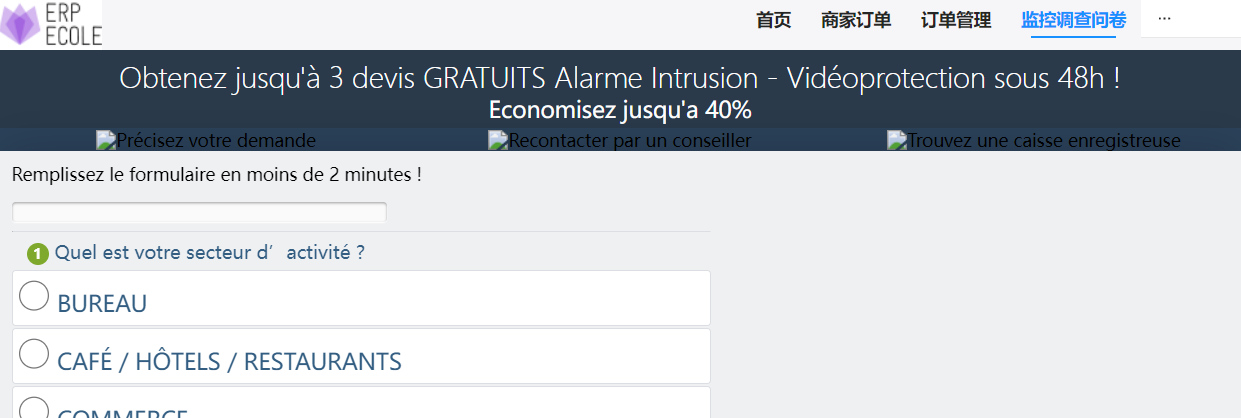
<rui_menunav>
<rui_menunav homepage="704249fa99f54fddb6cac9f9a8d00cba">
    ...
    <!-- 任意位置定义 menu -->
    <menu autonav mode="horizontal" style="background-color: #fff;">
        <menu.item class="testitem" page="704249fa99f54fddb6cac9f9a8d00cba">首页</menu.item>
        <submenu class="testitem" title="订单管理" >
            <menu.item class="testitem" page="cd91617a175b44a5b1a73af44a20839d">收货地址</menu.item>
            <menu.item class="testitem" page="68d926ed3eec42bbb24b5b48f60d16a3">我的订单</menu.item>
        </submenu>
    </menu>
    ...
    <!-- 任意位置定义 显示当前page内容的 容器 -->
    <rui_navpagecontainer>
        <!-- 此处不要写任何内容,rui_menunav会自动填充当前page的内容 -->
    </rui_navpagecontainer>
    ...
</rui_menunav>
属性:
| 属性 | 值 | 描述 |
|---|---|---|
| homepage | 指定首次显示的默认page | 可以为空,空则表示没有homepage,首次显示会显示空白 |
<menu>
定义菜单,菜单可以定义在 任何位置 示例如下:
<menu autonav mode="horizontal" style="background-color: #fff;">
    <menu.item class="testitem" page="4df8739dcb9949bca9267a9ea7396d55">商家订单</menu.item>
    <submenu class="testitem" title="订单管理" >
        <menu.item class="testitem" page="cd91617a175b44a5b1a73af44a20839d">收货地址</menu.item>
        <menu.item class="testitem" page="68d926ed3eec42bbb24b5b48f60d16a3">我的订单</menu.item>
    </submenu>
</menu>
属性:
| 属性 | 值 | 描述 |
|---|---|---|
| autonav | 是否自动导航 | true:自动导航,点击菜单条之后,系统自动显示对应的page内容,不需要自己处理,但是必须包括在 rui_menunav 标签中 false:不自动导航,需要自己处理 onClick事件 |
| mode | 显示方式 | 'horizontal' | 'vertical' | 'inline' + horizontal:横向显示一个标准的菜单条 + vertical 竖向显示一个标准弹出菜单条 + inline 竖向显示一个 折叠/展开 菜单 |
<submenu>
显示一个子菜单
<submenu class="testitem" title="订单管理" >
    <menu.item class="testitem" page="cd91617a175b44a5b1a73af44a20839d">收货地址</menu.item>
</submenu>
属性:
| 属性 | 值 | 描述 |
|---|---|---|
| title | 子菜单名称 |
<menu.item>
显示一个菜单条
<menu.item class="testitem" page="68d926ed3eec42bbb24b5b48f60d16a3"
env='{"ModuleCode":"6c1df6f2e30f4c34a6d10312c7b41980"}'>我的订单</menu.item>
<menu.item class="testitem" page="xxx"
env='{{$myAddressEnv}}'>我的地址</menu.item>
属性:
| 属性 | 值 | 描述 |
|---|---|---|
| page | 指定对应的pagecode | |
| [可选]env | 指定环境变量。 可以直接写json字符串,也可以使用 双还括号绑定 键值对mapObj变量 | |
显示所有有权限的menu
不需要手工编写Menu.item,而是通过指定 menuitems来显示对应的menu
<menu autonav menuitems="*" mode="horizontal" style="background-color: #fff;">
</menu>
指定多个menucode,中间用逗号隔开
<menu autonav menuitems="menucode1[,menucode2]" mode="horizontal" style="background-color: #fff;">
</menu>
<rui_navpagecontainer>
提供一个 给 rui_menunav 所使用的page内容显示的内容占位,标签内不能写任何内容 示例
<rui_navpagecontainer>
    <!-- 此处不要写任何内容,rui_menunav会自动填充当前page的内容 -->
</rui_navpagecontainer>
tabBar导航类扩展标签
tabBar导航为 底部出现tabBar,显示多个可切换页面内容,这种导航常见于窄屏的手机界面 整体导航布局示例
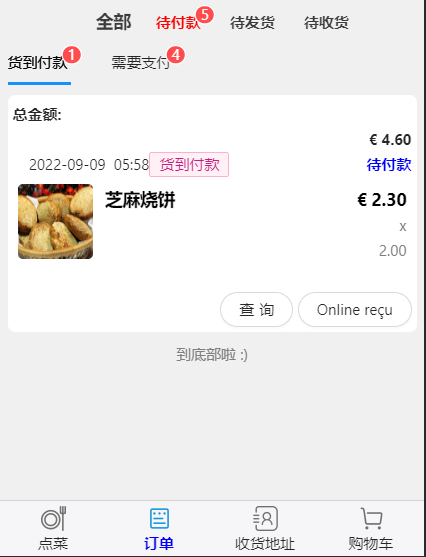
<rui_tabbarnav>
    <tabbaritem
        text="下单"
        iconPath="https://focusingpro.s3.amazonaws.com/images/dish_fork_mono.png"
        selectediconpath="https://focusingpro.s3.amazonaws.com/images/dish_fork_blue.png"
        pagepath="5ebf4a3393bf4732a69abebc6b443570" >
    </tabbaritem>
    <tabbartab
        text="浏览"
        iconPath="https://focusingpro.s3.amazonaws.com/images/order_mono.png"
        selectediconpath="https://focusingpro.s3.amazonaws.com/images/order_blue.png">
        <tabbaritem
            text="照片欣赏"
            iconPath="https://focusingpro.s3.amazonaws.com/images/order_mono.png"
            selectediconpath="https://focusingpro.s3.amazonaws.com/images/order_blue.png"
            pagepath="42c39131239f41f7ad801f425b67cff7" >
        </tabbaritem>
        <tabbaritem
            text="我的订单"
            iconPath="https://focusingpro.s3.amazonaws.com/images/order_mono.png"
            selectediconpath="https://focusingpro.s3.amazonaws.com/images/order_blue.png"
            pagepath="79e9ff734d7c4e819f8af86f4da14c52" >
        </tabbaritem>
    </tabbartab>
</rui_tabbarnav>
<rui_tabbarnav>
没有属性,仅仅是逻辑标签,包裹在 tabbaritem 和 tabbartab 的外层,逻辑上提供了 tabbar导航的功能
<rui_tabbarnav>
    ...
</rui_tabbarnav>
<tabbartab>
类似于 文件夹的功能,在这个 tabbar上面,会有tab包含多个 page
<rui_tabbarnav>
    <tabbartab text="浏览" iconPath="https://focusingpro.s3.amazonaws.com/images/order_mono.png"      selectediconpath="https://focusingpro.s3.amazonaws.com/images/order_blue.png">
        <tabbaritem ... ></tabbaritem>
        <tabbaritem ... ></tabbaritem>
    </tabbartab>
</rui_tabbarnav>
属性:
| 属性 | 值 | 描述 |
|---|---|---|
| text | 显示的文本 | 任何文本 |
| iconPath | 没有被选择时候的图标 | 图标url |
| selectediconpath | 被选择时的图标 | 图标url |
<tabbaritem>
对应单个page
<rui_tabbarnav>
    <tabbaritem text="下单"
        iconPath="https://focusingpro.s3.amazonaws.com/images/dish_fork_mono.png"
        selectediconpath="https://focusingpro.s3.amazonaws.com/images/dish_fork_blue.png"
        pagepath="5ebf4a3393bf4732a69abebc6b443570"
        env='{"ModuleCode":"6c1df6f2e30f4c34a6d10312c7b41980"}'>
    </tabbaritem>
    <tabbaritem text="我的"
        iconPath="https://focusingpro.s3.amazonaws.com/images/dish_fork_mono.png"
        selectediconpath="https://focusingpro.s3.amazonaws.com/images/dish_fork_blue.png"
        pagepath="5ebf4a3393bf4732a69abebc6b443570"
        env='{{$MeEnv}}'>
    </tabbaritem>
</rui_tabbarnav>
属性:
| 属性 | 值 | 描述 |
|---|---|---|
| text | 显示的文本 | 任何文本 |
| iconPath | 没有被选择时候的图标 | 图标url |
| selectediconpath | 被选择时的图标 | 图标url |
| pagepath | 对应的pagecdoe | |
| [可选]env | 指定环境变量。 可以直接写json字符串,也可以使用 双还括号绑定 键值对mapObj变量 | |
Stack页面栈导航类扩展标签
单页面导航 扩展标签 rui_pagenav
功能: 实现在单个区域内 显示一个homepage,代码内可以 导航函数显示 其他page的组件
<rui_pagenav page="xxxxxxxxxx" env='{{$MeEnv}}'>
</rui_pagenav>
<rui_pagenav page="xxxxxxxxxx" env='{"moduleCode":"xxxx"}'>
</rui_pagenav>
属性:
| 字段 | 意义 | 说明 |
|---|---|---|
| page | 默认page的pagecode | |
| [可选]ownerID | 如果没有填写,则使用 init的时候设置的 HostID | 默认不需要填写 |
| [可选]env | 默认page的bundle,可以填写Json字符串,或者javascript对象 | 默认不需要填写 |
| [可选]hideHead | 是否隐藏标题头 | 默认为flase:不隐藏 |
| [可选]rootPageTile | 默认为空,显示page的name | |
| [可选]rootPageSubtitle | 默认为空 | |
模板
模板定义
系统使用 模板实现 类似复用组件的功能,在 htmlx中可以定义模板,定义的语法如下: 使用 name属性 定义 模板的名称
<rui-rui_template name="tabWithBadge">
    <badge size="small" count='{{ _to_number(_list_getByIndex(_split(":",data),1))}}'>
        <span>{{_list_getByIndex(_split(":",data),0))}}</span>
    </badge>
</rui-rui_template>
模板引用
引用模板的时候,使用 is属性标注模板名称, data属性指定 参数
<div rui:for-item="orderitem" rui:for='{{_filter(_filterOrders(),"g=>_getCompondItemFieldValue(g,$CustomerPayTypeFieldCode) != $CustomerPayTypePayAfterReceive")}}' class="orderItem">
    <rui_template is="showorderitem" data="{{orderitem}}"></rui-rui_template>
</div>
通过函数使用 模板
在 一些组件中,一些属性需要返回 JSX.element,这种情况下, 使用本函数 通过模板产生 元素 _createElementByTemplate 具体参见 页面中的函数
自定义组件
系统支持自定义组件,组件的实现方式和page相同,只是 生命期和使用方法不同。 如果同时实现了 page的生命期函数 和 自定义组件的生命期, 则可以同时兼容 page和自定义组件
组件可以实现 自定义是否重新渲染,通过生命期函数控制
自定义组件的生命期
//当 组件挂接的时候
_onAttached()
{
    //...
}

//当 组件被 取消挂接的时候
_onDetached()
{
    //...
}

//控制组件在属性变化的时候,是否进行render操作
自定义组件的使用
定义组件 定义组件的方法和 定义 page一样
在page的json中设置引用组件,并且定义 标签名称
{ "usingComponents": { "footpage": "01f173c537694bb48840f73706d41ac2", "headpage":"15f2ff9426d54ba398e9460741b2a65b" } }- 在 该page的 html中 使用组件
使用 自定义标签 引用自定义组件
<headpage data="{{ {"allCartItems":allCartItems,"allMyInfos":allMyInfos} }}" ></headpage>
<footpage   />
页面相关函数
_showToast
给用户提示信息 duration:持续的毫秒数,如果等于0,则表示无限长,用户必须自己点击空白区域或者等待到时间 void _showToast(option:ShowToastOption)
export interface ShowToastOption
{
    text: string;  //显示的文本
    icon?: string;  //显示的图标
    duration?: number;  //持续时间
    mask?: boolean;  //是否显示遮罩
}

_showToast({title:"提示"},duration:2000);
_hideToast
//关闭 Toast _hideToast();
_showLoading
显示一个 滚动提示界面
void _showLoading(info:{string text,int duration,bool mask})
_hideLoading
关闭 滚动提示界面 void _hideLoading()
_showModal
_showModal(string ownerID,showModalOption option)
export interface showModalPageInfo
{
    htmlx:string;
    scriptx?:string;
    cssx?:string;
    multiLanguage?:{[key:string]:string};
}
export interface showModalOption
{
    title:string;//        否    提示的标题
    width?:number ;   //指定显示宽度

    showCancel?:    boolean;// 默认为    true    否    是否显示取消按钮
    cancelText?:    string;//     取消    否    取消按钮的文字,最多 4 个字符
    //cancelColor    string    #000000    否    取消按钮的文字颜色,必须是 16 进制格式的颜色字符串
    confirmText?:    string;//    确定    否    确认按钮的文字,最多 4 个字符
    //confirmColor    string    #576B95    否    确认按钮的文字颜色,必须是 16 进制格式的颜色字符串
    //editable    boolean    false    否    是否显示输入框    2.17.1
    //placeholderText    string        否    显示输入框时的提示文本    2.17.1
    //success    function        否    接口调用成功的回调函数
    //fail    function        否    接口调用失败的回调函数
    //complete    function        否    接口调用结束的回调函数(调用成功、失败都会执行)
    //object.success 回调函数
    onConfirm?:()=>void ;//点击    ok之后的回调函数  ,如果没有指定,返回 默认的 modalResult_ok,并且关闭对话框。 如果提供了,则 需要代码中自己调用 _exit()
    onCancel?:()=>void;  //点击cancel之后的回调函数  ,如果没有指定,返回默认的 modalResult_cancel,并且关闭对话框。 如果提供了,则 需要代码中自己调用 _exit()
    isShowHead?:boolean;  //是否显示 head, ,默认显示
    isShowFoot?:boolean;  //是否显示foot,默认显示
    isClosable?:boolean;   //是否显示关闭按钮,默认显示,直接点击close按钮,则返回 modalResult_cancel
    isMask?:boolean;    //是否显示遮罩  ,默认显示 true

    OKText?:string;  //OK显示的字符串
    CancelText?:string; //cancel显示的文本
    isHideCancel?:boolean;   //是否隐藏取消按钮

    //系统提供 以下 4种 方式 ,任选其一,下面4种方式的优先级就是下面的排列顺序
    pagecode?:string;  ///需要显示一个page的pagecode  第一优先级
    pageInfo?:showModalPageInfo;  //pageInfo,直接在代码中提供的 pageInfo 第二优先级
    templateName?:string;  //提供一个模板名称  第三优先级
    content?:string;//        否    提示的内容,只能是显示一个字符串 第四优先级

    // 当提供的内容为 pagecode 或者 pageInfo 或者 templateName 的时候,提供参数使用
    bundle?:any ;//     显示page的时候,给page提供的参数
}
_showActionSheet
显示一个 动作选择框 选择取消,返回 -1 ,如果选择其他动作,则返回索引号
export interface showActionSheetOption
{
    itemList:string[];  //选项列表
}

let result = await _showActionSheet({itemList:["A","B","C"]});
_createElementByTemplate
通过 templateName 创建 元素 _createElementByTemplate(string templateName,data:any)
_createElementByString
通过html创建元素 _createElementByString(string html);
流程控制类扩展标签
块标签 <block>
块标签 <block> 用来表示一个 元素块,等同于 <div>,但是和 <div>不同的是:<block>仅仅用来作为逻辑元素块使用,不能设置样式等属性,同时 在dom层面不产生任何html元素
使用场景: 当在 循环 或者 判断分支 的时候,如果没有合适的 元素作为 条件设置的元素,则可以使用 <block> 在区分 元素块
示例:
下面使用了 判断分支, 第一分支 因为 没有合适的 元素 作为 rui:if的 依附地,所以使用了 <block> rui:elif 因为可以使用 <div class="emptyCart">作为依附地,所以不需要使用 <block>
    <block rui:if="{{$isLoading}}">
        <!-- 如果在加载,则什麼都不顯示-->
    </block>
    <div class="emptyCart" rui:elif="{{_count(_dataSource_getAllCompondItems($dataSourceMyCart))==0}}">
    </div>
循环渲染 <rui:for>
实现界面元素的循环渲染 示例:
<rui_datasource datasource='{{_getChildDataSourceByTableCode(data,"bd9c9b92416a4b4bba105f86a2158d62")}}'>
        <div rui:for-item="orderdetailitem" rui:for='{{_getChildCompondByTableCode(data,"bd9c9b92416a4b4bba105f86a2158d62")}}' class="orderDetailItem" >
            <rui_datarow componditem={{orderdetailitem}}>
                <div class="orderDetailItem_imgContainer">
                    <img class="orderDetailItem_img"
                        src='{{_getCompondItemField(orderdetailitem,"398757c0a951461ea82daf3a56682b64")}}'
                        alt="菜品图片"></img>
                </div>
                <div class="orderDetailItem_content">
                    <div class="orderDetailItem_titleAndPrice" >
                        <div class="orderDetailItem_title">
                            <rui_datacell fieldcode="527076bf281c404ab564eb06c6104829"></rui_datacell>
                        </div >
                        <div class="orderDetailItem_price">
                            <rui_datacell fieldcode="b11d47e8674a47d0981b5c8504be731d" showunitleft></rui_datacell>
                        </div>
                    </div>
                    <div class="orderDetailItem_descriptonAndQuantity">
                        <div class=" orderDetailItem_descripton">
                            <b><span style="color: brown;"><rui_datacell fieldcode="bf2c38a79d0e40a08cd75cab73ece9f4"></rui_datacell></span></b>
                            <span><rui_datacell fieldcode="MyNote"></rui_datacell></span>
                        </div>
                        <div class=" orderDetailItem_Quantity">
                            x <rui_datacell fieldcode="155bc27dda304afa962f05c5084c3f05"></rui_datacell>
                        </div>
                    </div>
                    <!-- 可选属性 -->
                    <div style="color: blue;font-weight: 600;"><rui_datacell fieldcode="b7bd1f22f4734e16b6b78859aa86a11e"></rui_datacell></div>

                </div>
                <div class="clr"></div>
            </rui_datarow>
        </div>
        </rui_datasource>
属性:
| 属性 | 值 | 描述 |
|---|---|---|
| rui:for | 应该是一个List,作为 条件渲染的数据集合 {{_getChildCompondByTableCode(data,"bd9c9b92416a4b4bba105f86a2158d62")}} | 可以通过{{中的代码获取script中的变量}} |
| rui:for-item | 循环变量的名称 默认名称为 item 备注: 如果多层嵌套循环,则必须设置,否则会造成名称混淆 | children元素中可以使用 这个 名称作为循环变量 |
| rui:for-index | 循环索引号 int ,从0开始 默认名称为 index 备注: 如果多层嵌套循环,并且需要使用 index的情况下,则 可以根据需要 设置,以不造成名称混淆 | children元素中可以使用 这个 名称作为索引 |
| rui:key | 产生 react元素key 的代码 | 集合元素,react需要提供key用来区分集合的元素 |
条件渲染
注意:
- 所有条件 必须 以 <rui:if> 开始
- <rui:elif> 为可选项
- <rui:else> 为可选项,如果存在,则必须为最后一个,表示 整个 条件渲染的结束
- <rui:if> <rui:elif> <rui:if> <rui:else> 必须处在同一层次,且上下紧接着,中间不能夹杂其他标签,否则可能会造成条件的中断
- <rui:if> <rui:elif> <rui:if> <rui:else> 可以放在某个html标签上,例如 <div> <img>等等
- <rui:if> <rui:elif> <rui:if> <rui:else> 也可以放在 <block>上
- 因为语义上的问题, 条件渲染和 循环渲染不能在同一个 标签上,可以使用 <block> ,以体现优先级关系
例子:
<block rui:if='{{$currentState==$state_NewCreate}}'>
                <!-- 内容 -->
</block>
<block rui:else>
    <div rui:for-item="orderitem" rui:for="{{_filterOrders()}}" class="orderItem">
        <rui_template is="showorderitem" data="{{orderitem}}"></rui_template>
    </div>
</block>
<div rui:else>
    <!-- 内容 -->
</div>
界面隐藏
条件渲染的时候,因为 界面元素根据条件发生变化,导致 DOM也会发生变化,所以一个是界面刷新问题,同时也不能保持一些 滚动状态或者 Input的当前值 等等,所以 综合以上场景,可以使用界面隐藏
场景: 界面分成n个步骤,每个步骤显示一些内容让用户填写
选择界面隐藏而不是条件渲染的原因是: 需要保留所有用户输入的内容,在切换step的时候,状态和用户输入的数据不丢失
示例代码:_getClassWithStep(int step)方法如下:
function _getClassWithStep(int step)

    if ($curStep == step)
        return "normalfieldset";
    else
        return "hidefieldset";
    end if;
end function
对应的样式如下:
.normalfieldset
{
    display:block;
}

.hidefieldset
{
    display: none;
}
<fieldset id="step1" class="{{_getClassWithStep(1)}}">
    <legend><span class="number">1</span> 请输入选择的类型</legend>
    <input type="radio" name="data[activite]" value="Bureau" class="progress activite checkator"
            binddata="$type" binddatavalue="0">
    <a href="#" class="go2 button" onclick="()=>_setStep(2)"><i class="fa fa-check-circle-o" aria-hidden="true"></i> Continuer</a>
</fieldset>
<!-- etape 2 -->
<fieldset id="step2" class="{{_getClassWithStep(2)}}">
    <legend><span class="number">2</span> 请选择大小 ?</legend>
    <<label class="option-holder">
            <input type="checkbox" binddata="$testType"  binddatavalue="2" name="data[solution]" value="Vidéoprotection / Caméra" class="progress solution checkator">
            Vidéoprotection / Caméra
        </label>
    <a href="#" class="back1" onclick="()=>_setStep(1)">Revenir</a>
    <a href="#" class="go3 button" onclick="()=>_setStep(3)"><i class="fa fa-arrow-circle-o-right" aria-hidden="true"></i> Continuer</a>
</fieldset>
数据显示类扩展标签
页面css设计
css支持目前所有的 css样式
所有的非行内样式 必须 写在 css中,因为系统会对 非行内 样式进行处理,否则可能会导致整个page样式显示不正确
页面script设计
概述
页面的 script为一个 lambda表达式,其基本使用方式为:
 (ownerID,params)=>

   ...代码
   //变量区
    $isLoading = true;//是否正在加载数据
    $updateCount = 0;


    //以下为 数据部分
    $pageName = "Menu";

    $MyRangeKeyFieldCode = "MyRangeKey";
    $moneyFieldCode = "d4a9dbaffc424c5f8d0365e048e0ce50";
    $quantityFieldCode = "246b3fa07c934c3ca7f3c0df21348869";

   ...方法
   function _onClick()

        $isLoading = false;
        //刷新数据源
        _dataSource_ForceRefresh($dataSourceMyCart,ownerID,true);

        //刷新界面
        _refresh();

    end function

    function _onLoad()
       //...
    end function
- 代码区 可以定义 变量
- 方法区 可以定义 方法,方法必须在被调用前定义
- 方法区 中的 方法可以按照闭包的 原则 使用 代码区中的所有变量,所以需要注意 方法区中的 变量 和 代码区中的 变量的 重名问题
页面内置方法
页面会内置一些方法,可以直接调用
| 方法 | 功能 | 参数和备注 |
|---|---|---|
| _refresh | 触发界面刷新一次 | void _refresh() |
页面导航方法
页面会内置导航方法,可以在具体的导航场景下调用
| 方法 | 功能 | 参数和备注 |
|---|---|---|
| _switchTab | 切换到Tab页 | void _switchTab(string pagePath)只在tabBar导航的时候起作用 |
| _navigateTo | 弹出一个新页面 | void _navigateTo(string pagePath,string ownerID,mapObj bundle)该页面会在页面栈的最上面 |
| _redirectTo | 替换当前页面 | void _redirectTo(string pagePath,string ownerID,mapObj bundle)该页面替换页面栈的最上面一个页面 |
| _navigateBack | 回退(1+delta)个页面 delta默认为0表示退到上一个页面 | PageInfoAndTabPagePath|undefined _navigateBack(int delta) | _navigateBackToRoot | 回退到根页面 | void _navigateBackToRoot() | _getCurrentPage | 获取当前页面信息 | PageInfoAndTabPagePath|undefined _getCurrentPage() |
| _getGetNavigationStack | 用获取页面栈信息 | PageInfoAndTabPagePath[] _getGetNavigationStack() | _getRoot | 获取根页面信息 | PageInfoAndTabPagePath|undefined _getRoot() | _openPage | 打开一个新的Page页面 | void _openPage(ownerID:string,pagecode:string,bundle:{[key:string]:string}) | _replacePage | 替换当前的页面为新的Page页面 | void _replacePage(ownerID:string,pagecode:string,bundle:{[key:string]:string}) | _openUrl | 打开一个新的url | void _openUrl(url:string,bundle:{[key:string]:string}) | _getreplaceUrl | 替换当前页面为新的url | void _replaceUrl(url:string,bundle:{[key:string]:string}) |
页面栈
可以参考小程序的 页面生命期 小程序页面生命期
页面的生命期方法
页面有一些生命期方法,这些方法会在 合适的时机被调用 可以参考小程序的 页面生命期 小程序页面生命期
| 方法 | 被调用时机 | 参数和备注 |
|---|---|---|
| _onLoad | 页面被加载 | _onLoad()只会被调用一次 |
| _onReady | 页面被mount到界面 | _onReady()只会被调用一次 |
| _onShow | 页面显示 | _onShow()每次页面从 不显示状态 变成 显示状态的时候被调用 例如 当前显示A页面,用户点击 切换到B页面,则 A._onHide被调用,B._onShow被调用 |
| _onHide | 页面隐藏 | _onHide()参见上条 |
| _onUnload | 页面被卸载 | _onUnload()只调用一次 |
| _onPullDownRefresh | 用户向下拖动Page | 未实现 |
| _onReachBottom | 当前Page到达底部了 | 未实现 |
| _onShareAppMessage | 用户点击了右上角的share图标 | 未实现 |
| _onPageScroll | 页面滚动 | 未实现 |
| _changeLanguage(newLanguage:string) | 切换语言 | |
| _getCurrentLanguage():string | 获取当前语言 | |
| _onChangeLanguage() | 本page对于当多语言切换之后的处理函数。如果没有写,则系统默认更新多语言 |
嵌入page到原生html中
概述:为了实现客户门户网站的功能,可以将page嵌入到 客户原生的html中,为此,系统提供了多个函数接口,以便实现嵌入
引入js文件
需要进入多个js和css文件,这些文件都需要导致到 www的根目录下,引入的模式如下:
多语言
html中的多语言
html中的多语言需要综合考虑,可以选择如下2种:
- 每个html一个多语言 html文件,用户根据选择的语言看到 不同语言版本的html文件
- 一个html中动态支持多语言,需要编写的js代码较多,慎重选择
page中的多语言
page中的多语言使用的 page中多语言方案,即 page中定义多语言方案。 该方案提供每个page可以配置多语言的内容,同时 提供内置的 多语言函数,通过key获取对应的多语言
嵌入API
初始化和登录
初始化 FocusingPro.init
每个html中必须 首先调用 inti函数,目的是初始化数据。
函数: function FocusingPro.init(initParams:InitParams) 功能: 初始化嵌入系统数据 参数: InitParams
| 参数 | 意义 | 说明 |
|---|---|---|
| hostID | 归属的HostID,也就是owenrID或者是企业号 | 必填字段,后续默认访问的都是这个 owner的资源 |
| [可选]serverCode | 服务器,默认是 当前访问网站上的服务器 | 默认可选为:FocusingPro 商用服务器 ;
Local: 本地服务器 |Stand1|Stand2|Stand9|demos|demos1|demos2|demos3 |
| [可选]futuID | 当需要显示登录界面时,默认填写的FutuID | |
登录函数 FocusingPro.checkAndLoginParam
该函数可以根据要求,先判断是否已经登录了,如果是,则直接返回,不显示登录界面。 否则会显示登录界面
函数: function FocusingPro.checkAndLogin(param:checkAndLoginParam):Promise
| 参数 | 意义 | 说明 |
|---|---|---|
| [可选]defaultUserID | 显示登录界面时,userID填写的初始默认值 | 默认为空 |
| [可选]loginContainerID | 指定放置登录界面的divID | |
| [可选]forceRelogin | 如果已经登录了的话,是否强制重新登录 | 默认为否 |
退出登录 FocusingPro.logout
退出当前登录状态
function FocusingPro.logout():void
获取当前登录信息 FocusingPro.getLoginInfo
该函数可以获取到当前的登录信息
函数: function FocusingPro.getLoginInfo():longinInfo 功能: 获取到当前的登录信息 返回值: longinInfo
| 字段 | 意义 | 说明 |
|---|---|---|
| IsLogined | 是否在登录状态 | |
| MySelf | 当前登录账号的 个人信息 | |
| Host | 企业号的 信息 |
interface PublicUI_ProfileInfo
{
    Code :string = "";//{ get; set; } = "";
    Name:string = "";// { get; set; } = "";
    Avatar_Middle :string = "";
}
监听登录状态变化事件
//事件消息定义
interface loginChangedEventInfo
{
    OldState:boolean;  //老的登录状态
    newState:boolean;  //新的登录状态
}

//注册 通知消息
FocusingPro.SubscribeLoginChanged(function (info){
    //增加 发生 login状态发生变化的处理

});
dom操作相关
FocusingPro.renderMenu 绘制一个MenuItem
函数: function FocusingPro.renderMenu(param:renderMenuParm):Promise
| 字段 | 意义 | 说明 |
|---|---|---|
| menuID | 绘制的menuID | |
| containerID | 绘制到的div的ID | |
| [可选]ownerID | 如果没有填写,则使用 init的时候设置的 HostID默认不需要填写 | |
FocusingPro.renderPage 绘制一个page
函数: function FocusingPro.renderPage(param:renderPageParam):void 功能: 绘制一个Page到 dom中 返回值: 无。 异步函数 参数:
| 字段 | 意义 | 说明 |
|---|---|---|
| pageCode | 绘制的PageCode | |
| containerID | 绘制到的div的ID | |
| [可选]ownerID | 如果没有填写,则使用 init的时候设置的 HostID | 默认不需要填写 |
| [可选]env | 可以填写Json字符串,或者javascript对象 | 默认不需要填写 |
FocusingPro.renderPageNav 绘制一个单页面栈
函数: function FocusingPro.renderPageNav(param:renderPageParam):void 功能: 绘制一个Page到 dom中,同时在该 dom中实现一个页面栈 返回值: 无。 异步函数 参数: 等同于 FocusingPro.renderPage,参见 FocusingPro.renderPage
FocusingPro.renderControl 绘制一个组件
navigation相关操作
打开新的 html页面
重定向当前的 html页面
数据结构参考
基础数据结构
PublicUI_CompondItem
let compondItem;

// 获取 字段值
compondItem["fieldcode"]  //根据字段类型,会返回不同的类型。例如 数值类型double  string datatiem bool

// 设置字段值
compondItem["fieldcode"] = 123;  //设置 数值类型的字段的值
compondItem["fieldcode"] = "newStringValue";  //设置字符串类型的字符的值

//获取 字段的 可读的值
compondItem.getReadable("fieldcode");

//获取 字段的 单位:
compondItem.getUnit("fieldcode");

//获取 字段的 参数定义信息
compondItem.getParam("fieldcode");  //PublicUI_ParamDefineItem
PublicUI_CodeNameMimeType
export class PublicUI_CodeNameMimeType
    {
        //[DataMember]
         Code :string = "";//{ get; set; } = "";
        //[DataMember]
         Name:string = "";// { get; set; } = "";
        //[DataMember]
         MimeType :string = "";//{ get; set; } = "";//public Image Icon;
        //[DataMember]
         PublicUrl :string = "";//{ get; set; } = "";
         //[DataMember]
        ScirptStr :string = "";//{ get; set; } = "";

        //[DataMember]
         Note :string = "";//{ get; set; } = "";
        //[DataMember]
        Catalog :string = "";//{ get; set; } = "";
        //[DataMember]
        Description:string = "";// { get; set; } = "";
        //[DataMember]
        OwnerID :string = "";//{ get; set; } = "";
        //[DataMember]
         Creator :string = "";//{ get; set; } = "";

        //[DataMember]
         AdditionalKeyValue :string = "";//{ get; set; } = "";

         EnvRequirementInfo_JsonStr:string = "";
    }
###
export class PublicUI_ProfileInfo extends PublicUI_CodeNameMimeType
    {

        public  UserType:string ="";//{ get { return this.UserType_Enum.toString(); } set { AAA_UserTypeEnum userType = AAA_UserTypeEnum.NormalAccount; Enum.TryParse<AAA_UserTypeEnum>(value,

        //编辑脚本
        //[DataMember]
        public  EditScript:string = "";

        //[DataMember]
        public  Avatar_Small:string  = "";

        //[DataMember]
        public  Avatar_Middle :string = "";

        //[DataMember]
        public  Avatar_Big :string = "";

        public UserName:string = "";
        public UserEmail:string = "";
        public UserUrl:string = "";

        //Detail info
        public UserCompany:string = "";
        public UserCountry:string = "";
        public UserProvince:string = "";
        public UserDistrict:string = "";
        public UserAddress:string = "";
        public UserPostcode:string = "";
        public UserMobile:string = "";
        public UserFixPhone1:string = "";
        public UserFixPhone2:string = "";
        public UserFax:string = "";

        //Other info
        public Contact:string = "";
        public Enterprise_Type:string = "";
        public Bank_Account:string = "";
        public Sale_Mode:string = "";
        public Sale_Scope:string = "";
        public Product_Scope:string = "";
        public Register_Money:string = "";

    }
longinInfo
//当前登录信息
interface longinInfo
{
    IsLogined : boolean; //是否已经登录
    MySelf?:PublicUI_ProfileInfo;
    Host?:PublicUI_ProfileInfo;  //登录的企业号信息
}
CompareCondition
  new Condition(string propertyName,string compareName,string value);

case "="       :return ItemServiceProviderCompareType.Equal                                   ;
            case ">"      :return ItemServiceProviderCompareType.GreatThan                                ;
            case ">="      :return ItemServiceProviderCompareType.GreatAndEqual                            ;
            case "<"      :return ItemServiceProviderCompareType.LessThan                                 ;
            case "<="      :return ItemServiceProviderCompareType.LessAndEqual                             ;
            case "!="      :return ItemServiceProviderCompareType.NotQqual                                 ;
            case "%A"      :return ItemServiceProviderCompareType.StringLeftLike                           ;
            case "A%"      :return ItemServiceProviderCompareType.StringRightLike                          ;
            case "Contain" :return ItemServiceProviderCompareType.StirngBothLike                               ;
            case "NULLOrE":return ItemServiceProviderCompareType.IsNullOrEmptyValue       ;
            case "NNNorE" :return ItemServiceProviderCompareType.IsNotNULLEitherEmptyValue;
            case "NULL"    :return ItemServiceProviderCompareType.IsNULL                                  ;
            case "NN"      :return ItemServiceProviderCompareType.IsNotNull                                ;
            case "In"      :return ItemServiceProviderCompareType.In                                       ;
            case "NotIn"   :return ItemServiceProviderCompareType.NotIn                                    ;
datasource
- 新建datasource
let dataSource = new DirectDataSource(string queryID, string name,string providerItemKey,string|List<ItemServiceProviderCustomerCondition>|null fixedConditionList = null,string getCompondParamActionCode = "");
- 到数据库刷新记录
ForceRefresh(ownerID:string, isNotifyChanged?:boolean ,requestOffset?: number , requestLimit?: number, orderByCodeList?: string|string[]|List<string>):Promise<void>;
获取所有记录
public GetAllItems():PublicUI_CompondItem[]获取 所有 未删除的记录
public GetAllNotDeletedItems():PublicUI_CompondItem[]AddItemToDataSource 向数据源中插入一条记录
AddItemToDataSource(newItem:/*KyeAdnNameAndCreatorAndACLAbstractBase_ORM*/PublicUI_CompondItem_Value|PublicUI_CompondItem,actionCode:string,envViables:{[key:string]:string}):Promise</* number */string>;更新数据源中的一条记录 UpateItemToDataSource
UpateItemToDataSource(updatedItem:/*KyeAdnNameAndCreatorAndACLAbstractBase_ORM*/PublicUI_CompondItem_Value|PublicUI_CompondItem,actionCode:string,envViables:{[key:string]:string}):Promise<number>;删除数据元中的一条记录
`javascript //强制刷新一条记录(从服务器或者这条记录的最新值,刷新到界面上)ForceRefreshItemFromServer(/* customerTableItem: PublicUI_CompondItem_Value */OwnerID:string,HashKey:string,RangeKey:string):Promise<PublicUI_CompondItem_ValueAndParams|undefined> //从数据源中 删除一条记录 DeleteItemFromDataSource(actionCode:string,/* customerTableItem:PublicUI_CompondItem_Value */hashKey:string, rangeKey:string,envViables:{[key:string]:string}):Promise<number>;
    /// <summary>
    /// 当前选择的条目
    /// </summary>
    /// <returns></returns>
    /*object*/
     getSelectedObject():PublicUI_CompondItem_Value|undefined;
     getSelectedObject_CompondItem():PublicUI_CompondItem|undefined;

    public getAllCompondItems():PublicUI_CompondItem[];

    public  AddChildDependItem( childDataSource:ItemsManageDataSourceBase,  dependInfo:PublicUI_LayoutConfigDependInfo):void;

    //将缓存的修改数据 FLush刷新到 Provider
    Flush(ownerID:string):Promise<void>;

    async getSingleItem(ownerID:string,/* customerTableItem:PublicUI_CompondItem_Value */hashKey:string, rangeKey:string ,actionCode:string, envViables:{[key:string]:string}):Promise<PublicUI_CompondItem>

    RefreshItems(ownerID:string, isNeedGroupBy:boolean/*string filter, string OrderByCodeList = "", List<ItemServiceProviderCustomerCondition> ConditionList = null*/
    /* ,onSuccess:()=>void, onFail:(reason:any)=>void */
    , isOnlyGetStruct:boolean, isReturnOriginalItems:boolean, requestOffset:number, requestLimit:number, orderByCodeList:string):Promise<void>;
`